
If you're adding a new Australian recipient for the first time, see How to send AUD to an Australian bank account instead.
Before you start
What you'll need
- An active Send account.
- Your recipient's Australian BSB (6 digits).
About BSB numbers
- A BSB (Bank-State-Branch) is a 6-digit number that identifies a bank and branch in Australia.
- Your recipient can find their BSB on their bank statement, in their online banking, or by asking their bank.
- A BSB is sometimes written with a hyphen (for example, 062-000). You can enter it with or without the hyphen - Send will remove any hyphens and spaces for you.
About local payment rails and SWIFT
There are two main ways banks move money between accounts:
- Local payment rails are the networks banks use to send money within a single country. In Australia, local payment rails are used for domestic payments between Australian banks.
- SWIFT is an international messaging network that banks use to send money across borders. Depending on the payment route, a SWIFT payment chain can involve one or more intermediary banks between the sending bank and the recipient's bank.
To send AUD to an Australian bank account using a local payment route, where supported, we need the recipient's BSB and account number.
How to update a recipient’s BSB
Step 1: Open the alert in the Send Portal
- Sign in to the Send Portal.
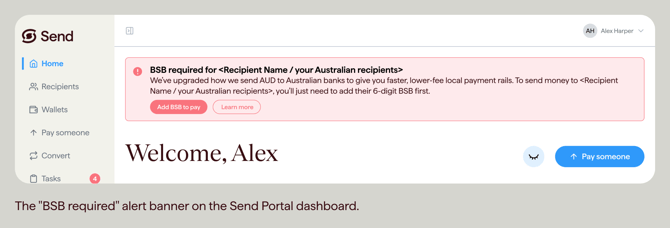
- If one or more of your Australian recipients needs a BSB, you'll see a BSB required alert at the top of your dashboard:
- If one recipient needs updating, the alert will show that recipient's name.
- If more than one recipient needs updating, the alert will refer to your Australian recipients as a group.
- Select Add BSB to pay.
Step 2: Add the BSB
- You'll be taken to the recipient's details.
- Enter the recipient's BSB. You can type it with or without a hyphen - Send will remove any spaces and hyphens for you.
- Send will check the BSB against a list of Australian banks:
- If we find a match, you'll see the bank and branch name on screen. Check that this matches your recipient's bank before continuing.
- If we can't find a match, you'll see a message asking you to check the BSB. Confirm the BSB with your recipient before continuing.
- Select Save.
Step 3: Check the recipient's status
- After you save the BSB, the recipient's status may show as:
- Pending - the recipient still needs an action (such as adding a BSB or providing extra information).
- Ready - the recipient is ready to use.
- When the status changes to Ready, you can send them money.
What happens next
- The recipient's SWIFT details will be replaced with the BSB and account number.
- Any transactions you've previously made to the recipient (including historical SWIFT payments) will still be visible in your account.
- If the recipient's status stays Pending after you've saved the BSB, there may be other information we need before you can pay them. Please contact our support team.
Common questions
Why do I have to provide a BSB if I've paid them before?
We've updated how we process AUD payments to Australian bank accounts. Previously, these payments were routed internationally using SWIFT (a SWIFT/BIC code and account number). AUD payments to Australian bank accounts may now be sent using local Australian payment rails, where supported, which use a BSB and account number. To send AUD to your existing Australian recipient using a local payment route, we need their 6-digit BSB.
How long before I can send money to this recipient?
After you save the BSB, the recipient's status may show as Pending or Ready. When the status changes to Ready, you can send them money. If the status is still showing Pending after you've saved the BSB, please contact our support team.
How do I know if the BSB and bank details are correct?
When you enter a BSB in the portal, Send checks the BSB against Australian banking records and displays the matched bank and branch name on screen. We confirm that the BSB exists, but please check with your recipient that the bank name shown matches their account.
Will I need to provide any additional information?
If we need more information to update the recipient or review a payment, our support team will contact you directly via a portal task or email.
Contact us
Call Us
Phone: 1800 982 418
International: +61 7 5619 5700
Hours: 8:30am - 5:30pm AEST/AEDT, Monday - Friday