
If you've been migrated to our new platform
Recipients you previously paid via SWIFT may still have international details saved on file. To pay an Australian bank account using fast local rails, simply add them again as a new recipient using their BSB and Account Number.
Before you start
What you'll need
- An active Send account.
- Your recipient's full legal name and residential address.
- Your recipient's Australian BSB (6 digits) and account number.
About BSB numbers
- A BSB (Bank-State-Branch) is a 6-digit code identifying an Australian bank and branch.
- Your recipient can find their BSB on a bank statement or via online banking.
- BSBs are often formatted with a hyphen (e.g.,
062-000). You can type it with or without spaces/hyphens, Send will reformat it automatically.
SWIFT vs. Local Payment Details: What’s the difference?
Banks move funds using two primary methods:
- BSB & Account Number (Local Payment Rails): domestic networks used to transfer funds directly between Australian banks.
- SWIFT (International Rails): cross-border networks used for international transfers. These may pass through intermediary banks, which may incur extra processing fees and longer delivery times.
Why use a BSB instead of SWIFT?
Paying locally via BSB usually means lower to no fees, no intermediary bank deductions, and faster transfer times.
How to add a recipient using BSB and Account number
Step 1: Open the Recipients page
- Sign in to the Send Portal.
- In the left-hand navigation menu, select Recipients.
Step 2: Start adding a new recipient
- At the top right of the Recipients page, select Create recipient.
- Choose the recipient type:
- Myself or My business account - if you are transferring funds to your own Australian account.
- A person - if you're paying another individual. See How to add a new individual recipient.
- A business or trust - if you're paying a business or trust. See How to add a new business or trust recipient.
Step 3: Select the currency and bank country
- For Bank country, choose Australia.
- For Currency, choose AUD.
Step 4: Enter the recipient's details
Enter the recipient's details exactly as they appear on their bank account:
- Full legal name
- Residential address
Step 5: Enter the Australian bank details
- Enter the BSB (spaces and hyphens are accepted).
- Enter the account number.
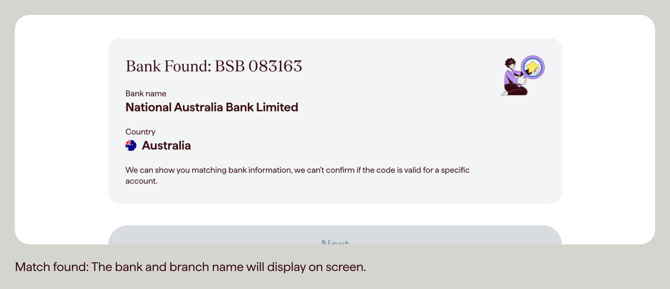
- Automatic Bank Verification: Send will check the BSB against Australian banking records:
- Match found: The bank and branch name will display on screen. Please double-check that this matches your recipient's bank.
- No match found: An alert will ask you to verify the BSB. Confirm the 6-digit code with your recipient before continuing.
- Select Next.
Step 6: Review and save
- Review all the details carefully.
- Select Save.
What happens next
- Your new recipient will go through a verification check.
- While verification is in progress, you may see one of these statuses:
- Active - the recipient is ready to use.
- Pending - the recipient is being reviewed.
- If your recipient is still Pending and you have an urgent payment, please contact our support team.
Common questions
I can't find the "Create recipient" button
- Make sure you're on the Recipients page in the Send Portal.
- The button is at the top right of the page.
- If you still can't see it, please contact our support team.
My BSB isn't recognised
- Check you've entered 6 digits. Spaces and hyphens are fine.
- Double-check the BSB with your recipient or on a recent bank statement.
- If Send still can't find a match, please contact our support team.
Does this change anything for my existing recipients overseas?
- This article covers AUD payments to Australian bank accounts.
- For recipients in other countries, the required bank details and the supported payment route may differ. Please check each recipient's details when adding them.
Can I still pay a recipient that only has SWIFT details?
- Availability will depend on the supported payment route for that recipient and payment.
- If you want to use local payment rails for an AUD payment to an Australian bank account, add the recipient's BSB and account number as a new recipient.
- If you're unsure, please contact our support team.
Contact us
Call Us
Phone: 1800 982 418
International: +61 7 5619 5700
Hours: 8:30am - 5:30pm AEST/AEDT, Monday - Friday
Email Us