
Before you start
- You'll need a Send account.
- You'll need your recipient's CPF number ready.
- Send will only ask for this when:
- You're adding an individual recipient (not a business), and
- The recipient's country is Brazil, and
- You're sending in Brazilian Real (BRL).
What is a CPF?
The CPF (Cadastro de Pessoas Físicas) is an 11-digit tax identification number used for individuals in Brazil.
Why we ask for it
We ask for this information to identify the recipient, meet local payment requirements and support our compliance checks.
Where to get the number
Your recipient is the best person to provide this number. If they aren't sure where to find it, common sources include:
- A Brazilian national ID card (Carteira de Identidade, or RG)
- A Brazilian passport
- Tax documents from the Brazilian tax authority (Receita Federal do Brasil)
If your recipient is unsure, please ask them to confirm their CPF with their own records.
Steps to adding a recipient with a CPF
Step 1: Open the Add recipient screen
- Log in to your Send account.
- Go to the Recipients page.
- Select Add recipient.
- Choose Individual as the recipient type.
- Select Brazil as the recipient's country.
- Select Brazilian Real (BRL) as the currency.
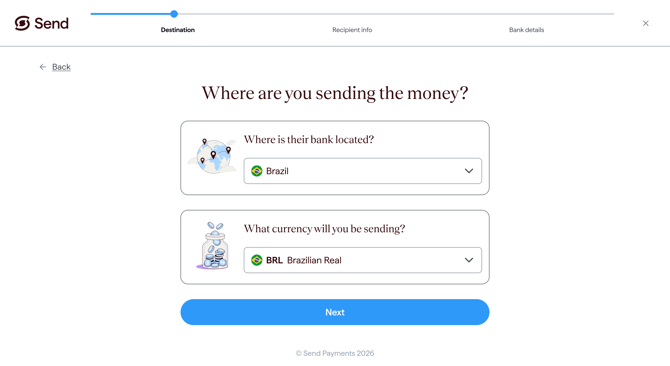
Step 2: Enter the CPF number
Enter the CPF into the Provide the Cadastro de Pessoas Físicas (CPF) field. Follow any on-screen instructions and any validation messages shown to you as you type.
- Enter all 11 digits.
- Don’t include spaces, periods or hyphens
Suggested visual: add a screenshot showing the CPF entered correctly
Step 3: Continue adding the recipient
- Once the number has been entered, continue with the remaining recipient details.
- Review the information before you save the recipient.
What happens next
- If the information entered is not accepted, check the number with your recipient and try again.
- Once you save the recipient, we’ll review their details. You’ll be able to make a payment to them once they’ve been approved. For more information, see How long does it take to verify my recipient?
- If we need to confirm any details, we may contact you for more information.
Common questions
I don’t know my recipient’s CPF
- Ask your recipient to provide their CPF from their official tax or identification records.
- The CPF is required before you can finish adding the recipient.
- Send cannot retrieve or confirm the number for you.
I'm getting an error when I enter the CPF
If the field shows an error or won't accept what you've entered, please follow the on-screen message.
You may want to check that:
- The number is correct with your recipient.
- You've entered all 11 digits.
- You haven’t included dots, dashes, or spaces.
- The number matches the format guidance shown on screen.
My recipient is an business, not a individual
- A CPF is used for individual recipients. If your recipient is a business, you may need to provide their CNPJ instead.
- For more information, see What is a CNPJ and why do I need it for my Brazilian recipient?
I can't continue adding my recipient without it
- You'll need to enter the required CPF information before you can continue.
- If you don't have it yet, come back once your recipient has shared it with you.
My recipient doesn't have a CPF, or doesn't want to share it
The required identification number must be provided before you can finish adding the recipient. Contact our support team if you believe the field does not apply to your recipient.
Why do you ask for this?
We may ask for this information to help identify the recipient, meet local payment requirements and support our compliance checks.
Contact us
Call Us
Phone: 1800 982 418
International: +61 7 5619 5700
Hours: 8:30am - 5:30pm AEST/AEDT, Monday - Friday