
If you don't recognise a transaction or think your account has been used without your permission - please read the security and scams article and contact us straight away
Before you start
- Have your Send account login ready.
- Know roughly when the transaction was made and the amount you booked.
- If your recipient says they received less than expected, it helps to have their bank statement or a screenshot showing what they received.
Step 1: Open the transaction in Send
- Log in to your Send account.
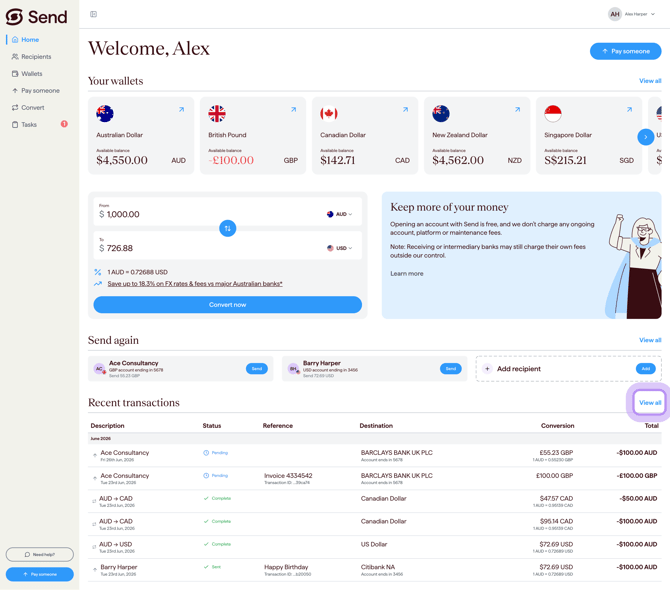
- On your dashboard, your most recent transactions are shown.
- Click View all transactions to see the full list.
- Select the transaction you want to check.
Step 2: Compare the booked amount with what was sent or received
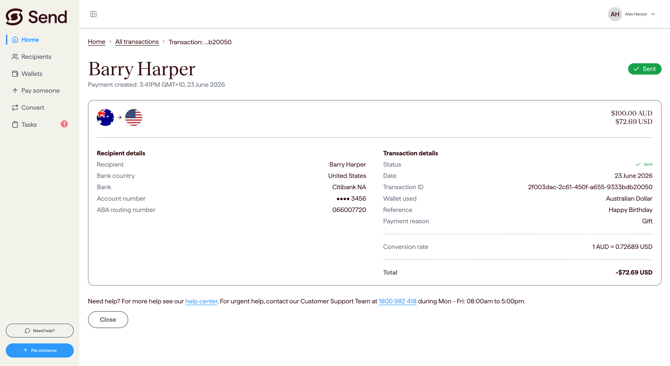
- Check the amount you booked, the currency, the recipient, and the date.
- If the transaction is a transfer to a recipient, compare the amount you sent with the amount your recipient received.
- A small difference is often caused by fees taken by other banks along the way (see Step 3).
Step 3: Check whether other banks have charged a fee
When you book a payment or transfer with Send, we confirm any Send fees with you upfront. Send always sends the exact amount shown on your booking confirmation and does not take any fee from the amount going to your recipient.
However, when you make an international transfer, your money may pass through one or more banks before it reaches your recipient. Intermediary and receiving banks may apply their own fees, which are outside Send Payments' control. This can mean your recipient receives a different amount from the one on your booking confirmation.
The two most common causes are:
- An intermediary bank (a bank that helps move the payment) applying a handling fee.
- The recipient's bank applying a receiving fee.
If your recipient received a different amount, please ask them to check with their bank for any deductions.
Step 4: Contact the right team
Pick the option that matches your situation:
- You want help understanding a transaction - contact our support team using the details at the bottom of this article.
- You don't recognise a transaction or think your account has been used without your permission - please read the security and scams article and contact us straight away.
- You're not happy with Send's service or how a matter has been handled and want to make a formal complaint - please use the complaints process described below.
What happens next
If you contact support with a question or to check a transaction
- Our support team will review the transaction and respond to you.
- You don't need to do anything else while we look into it, unless we ask for more information.
- If we need to contact a partner bank for more information, the response may take longer.
If the difference is caused by fees from other banks
- No further action is usually needed - this is a normal part of international transfers.
- Receiving or intermediary banks may charge their own fees, which are outside Send Payments' control.
If you raise a formal complaint
- We will acknowledge your complaint within 1 business day.
- We aim to resolve complaints within 30 days.
- If your complaint is not resolved, you can escalate it to the Australian Financial Complaints Authority (AFCA). See the complaints section below for full details.
Making a formal complaint
If you are dissatisfied with Send's service, staff, products, or how your matter has been handled, you can make a formal complaint.
- Email our Complaints Team: complaints@sendpayments.com
- We will acknowledge your complaint within 1 business day.
- We aim to resolve complaints within 30 days.
If your complaint is not resolved to your satisfaction, you can escalate it to the Australian Financial Complaints Authority (AFCA):
- Website: www.afca.org.au
- Phone: 1800 931 678
For more details, please read How do I make a complaint?
Common questions
My recipient received less money than I sent
- This is usually because an intermediary bank or the recipient's bank has applied a fee.
- Ask your recipient to check their bank statement or contact their bank to confirm any deductions.
- Receiving or intermediary banks may charge their own fees, which are outside Send Payments' control.
The amount on my statement looks different from what I booked
- Check the transaction details in Send to confirm the amount, currency, and date.
- If you booked an exchange between currencies, the amount shown will reflect the rate at the time of booking.
- For help understanding a specific charge, please contact our support team.
There's an extra fee or charge I don't recognise
- Some fees on international transfers come from intermediary or recipient banks rather than from Send.
- For help understanding a charge on your transaction, please contact our support team.
- You can also read Are there any fees for opening an account? for more on what Send does and doesn't charge.
I don't recognise this transaction at all
- If a transaction looks unfamiliar or you didn't make it, please read Security and scams and contact us straight away.
I want to make a formal complaint about a transaction
- Please follow the steps in the Making a formal complaint section above, or read How do I make a complaint? for more detail.
I'm not sure the recipient's account details are right
- If you're worried the payment was sent to the wrong account, please read Can you confirm account details are correct? and contact our support team as soon as possible.
Important information
This information is general only and does not take your personal circumstances into account. Send Payments provides foreign exchange and remittance services only. Send Payments Limited holds an Australian Financial Services Licence (AFSL No. 509635).
Contact us
Call Us
Phone: 1800 982 418
International: +61 7 5619 5700
Hours: 8:30am - 5:30pm AEST/AEDT, Monday - Friday