
What is a South African bank code ?
A South African bank code is a 6-digit number used to identify a bank or branch in South Africa.It may also be called a branch code or universal branch code.
- It is similar to a BSB in Australia, but it is used inside South Africa.
- A bank code identifies the bank or branch, not the account. You will also need an account number.
When may you be asked for a bank code
You may see a bank code field when you’re adding a recipient in South Africa.
If you're sending a different currency to a recipient in South Africa, you'll be asked for a SWIFT/BIC code instead. For more information, see Information on SWIFT BIC numbers.
Universal branch codes
Most major South African banks use a universal branch code. This is a single 6-digit code that can be used for that bank, regardless of the specific branch where the account is held.
If your recipient gives you a universal branch code, you can enter it if Send asks for a bank code.
If you're not sure which code to use, your recipient or their bank can confirm the correct 6-digit code.
Before you start
To add a South African recipient, you may need:
- The recipient’s full name
- The recipient’s account number
- The recipient’s full address
- The recipient bank’s SWIFT/BIC code
- The recipient’s bank code, if required
- Any other details shown in Send
Your recipient or their bank is the best source for confirming the correct bank details.
Where to get the bank code
Your recipient is the best person to provide this code.
If they’re not sure where to find it, they can check:
- Their online banking. Many South African banks show the bank code in the account details section, often next to the account number.
- A recent bank statement. The bank code is usually printed near the account number.
- The bank's official website. Some banks list their bank codes in their FAQs or on their branch pages. Ask your recipient to use the bank's official website rather than search results.
- Their bank directly.
Steps to adding a recipient’s bank code
Step 1: Open the Add recipient screen
- Log in to your Send account.
- Go to the Recipients page.
- Select Add recipient.
- Select South Africa as the recipient's country.
- Select South African Rand (ZAR) as the currency.
Step 2: Enter the bank code
Type the 6-digit code into the Bank code field.
- Don't add spaces or dashes.
- When you enter a recognised code, Send will show the matching bank name and country below the field.
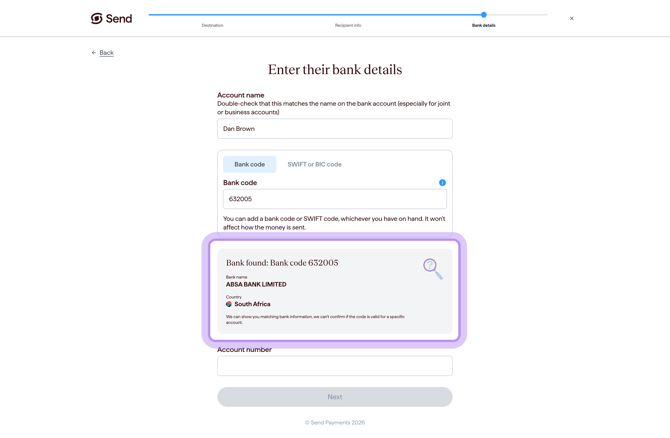
Step 3: Check the match
Before continuing, check the bank code against the details provided by your recipient.
You should also check the recipient’s account number, name, address and SWIFT/BIC code before saving.
What happens next
When you enter a bank code on Send:
- Send checks the code and shows you the bank name and country it matches.
- If the code is not recognised, you'll see the message describing the error. You won't be able to continue until a valid bank code is entered.
- Once the code is accepted, you can finish setting up the recipient and send your transfer.
- A format check does not confirm that all recipient details are correct or that the account belongs to the recipient.
Common questions
I entered the bank code but the payment was rejected or returned
A rejected or returned payment can happen for different reasons, including incorrect or incomplete recipient bank details.
- Check the bank code, account number, and other recipient details with the recipient or their bank.
- If the payment has been returned, contact our support team for help with next steps.
My recipient gave me a 4-digit code, not 6 digits
Send needs a full 6-digit bank code.
- Ask the recipient to confirm the full 6-digit bank code (or universal branch code) with their bank.
Send won't accept the code I entered
The Bank code field doesn't accept spaces or dashes.
- Remove any spaces or dashes and enter only the 6-digit number.
- If it's still not recognised, double-check the code with the recipient or their bank.
Do I need a bank code or a SWIFT code?
It depends on the currency you're sending:
- If you're sending ZAR to South Africa, you'll be asked for a bank code and account number.
- If you're sending another currency to South Africa, you'll be asked for a SWIFT/BIC code and account number.
Send will show you the correct fields based on the country and currency you select. For more on SWIFT/BIC, see Information on SWIFT BIC numbers.
The code I found online doesn't match what's on the statement
- Use the bank code confirmed by the recipient or their bank.
- A bank may have more than one code (for different branches), so the recipient's bank can confirm which one applies to their account.
Bank code vs other bank codes
Different countries use different codes to identify a bank or an account. A South African bank code is one of many. Here's how it compares:
- Bank code (South Africa) identifies a South African bank or branch, used inside South Africa.
- SWIFT/BIC identifies the bank, internationally.
- IBAN identifies the specific account, used in Europe and many other regions.
- Routing, sort, and BSB codes are used inside one country (for example, ABA routing in the US, sort codes in the UK, BSB in Australia).
For details on the other codes, see:
- Information on SWIFT BIC numbers
- IBAN (Multiple countries)
- Clearing Codes (Multiple countries)
- Account number (New Zealand)
- ABA codes (United States)
- Account type (India)
- Agency codes (Brazil)
- Sort numbers (United Kingdom)
- CBU codes (Argentina)
- CLABE (Mexico)
Contact us
Call Us
Phone: 1800 982 418
International: +61 7 5619 5700
Hours: 8:30am - 5:30pm AEST/AEDT, Monday - Friday