
Before you start
- You'll need a Send account.
- This information is only required when sending Peruvian Soles (PEN) to Peru. It is not required for payments in AUD, USD or EUR.
- You'll need to ask your recipient which identification number applies to them and have this number ready before you start adding them.
- Your recipient will have either a DNI or a FRC - not both.
What is a DNI or Carné de Extranjería?
- The Documento Nacional de Identidad (DNI) is the 8-digit personal identification number used by Peruvian residents.
- The Carné de Extranjería, also known as the Foreign Registration Card (FRC), is the personal identification number used by foreigners living in Peru.
- When you reach this step, the Send screen will show you the format and length required for the selected identification type.
Why we ask for it
We may ask for this information to help identify the recipient, meet local payment requirements and support our compliance checks.
Where to get the number
Your recipient is the best person to provide this number. If they aren't sure what to give you, ask them to check their official identification documents.
- A Documento Nacional de Identidad (DNI) is shown on their Peruvian National Identity Document.
- A Carné de Extranjería (FRC) is shown on their Foreign Resident Card.
Steps to adding a recipient with a DNI or FRC
Step 1: Open the Add recipient screen
- Log in to your Send account.
- Go to the Recipients page.
- Select Add recipient.
- Choose Individual as the recipient type.
- Select Peru as the recipient's country.
- Select PEN as the currency you're sending.
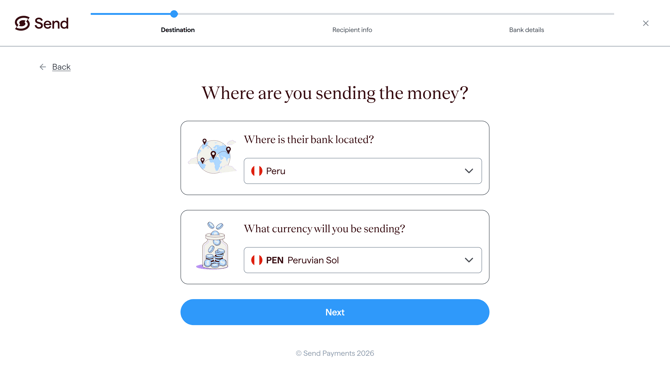
Step 2: Enter the identification number for tax
- In the tax number field, use the dropdown to choose whether your recipient has a DNI or a FRC.
- Enter the number exactly as shown on your recipient's identification document.
- Follow any format guidance shown on screen.
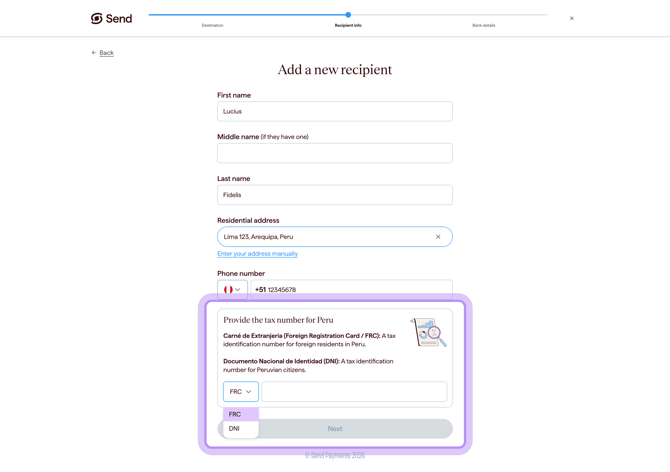
Step 3: Continue adding the recipient
- Once the number is entered, continue with the rest of the recipient details.
- Review the information before you save.
- For the full process of adding a recipient, see How to add a recipient.
What happens next
- If the information entered is not accepted, check the number with your recipient and try again.
- Once you save the recipient, we'll review their details. You'll be able to make a payment to them once they've been approved. For more information, see How long does it take to verify my recipient?
- If we need to confirm any details, we may contact you for more information.
Common questions
I don't see the tax number field
- This field only appears when you're sending Peruvian Soles (PEN) to a recipient in Peru.
- If you're sending another currency, such as AUD, USD or EUR, you won't be asked for this.
I don't know if my recipient has a DNI or a FRC
- Ask your recipient which identification document applies to them.
- Peruvian residents generally use a DNI, while foreign residents may use a FRC.
- Your recipient should confirm the number directly from their identification document.
I don't know my recipient's identification number for tax
- Only the recipient (or someone they trust) will have this information. We can't look it up for you.
- Ask your recipient to provide it from their official identification documents.
The form won't accept the number I entered
- Check that the number matches the format guidance shown in the field.
- Make sure you've selected the correct identification type in the dropdown.
- Double-check the number with your recipient.
I can't continue adding my recipient without it
- You'll need to enter the required information before you can continue.
- If you don't have it yet, come back once your recipient has shared it with you.
My recipient doesn't have a DNI or a FRC, or doesn't want to share it
The required identification number must be provided before you can finish adding the recipient. Contact our support team if you believe the field does not apply to your recipient.
Why do you ask for this?
- We may ask for this information to help identify the recipient, meet local payment requirements and support our compliance checks.
Contact us
Call Us
Phone: 1800 982 418
International: +61 7 5619 5700
Hours: 8:30am - 5:30pm AEST/AEDT, Monday - Friday