
What is an IBAN?
IBAN stands for International Bank Account Number.
It is a code made up of letters and numbers that identifies a specific bank account for international payments.
Many countries in Europe, the Middle East, and other regions use IBANs.
An IBAN starts with a 2-letter country code. For example:
- GB for the United Kingdom
- FR for France
- AE for the United Arab Emirates
Send may ask for an IBAN when it is required for the country, currency or payment route you’re using.
How is an IBAN different from a SWIFT/BIC code?
- An IBAN identifies a specific bank account, including the bank and the country where it is held.
- A SWIFT/BIC identifies a specific bank.
For some payments, you may need both an IBAN and a SWIFT/BIC code. If Send asks for a SWIFT/BIC code as well, ask your recipient to provide it.
For more information, see Information on SWIFT/BIC numbers.
Where to get the IBAN
Your recipient is the best person to provide their IBAN.
If they’re not sure where to find it, they can check:
- Their online banking. Many banks show the IBAN in the account details section.
- A recent bank statement. The IBAN is usually printed near the account number.
- Their bank directly.
How long is an IBAN?
- An IBAN's length is fixed for each country, but the length is different from country to country.
- If the IBAN looks too short or too long, ask your recipient to double-check it with their bank.
IBAN code formatting guide per country
| Country | Code | Length | IBAN Example |
|
Andorra |
AD |
24 |
AD1400080001001234567890 |
|
Austria |
AT |
20 |
AT483200000012345864 |
|
Belgium |
BE |
16 |
BE71096123456769 |
|
Brazil |
BR |
29 |
BR1500000000000010932840814P2 |
|
Bulgaria |
BG |
22 |
BG19STSA93000123456789 |
|
Croatia |
HR |
21 |
HR1723600001101234565 |
|
Cyprus |
CY |
28 |
CY21002001950000357001234567 |
|
Czech Republic |
CZ |
24 |
CZ5508000000001234567899 |
|
Denmark |
DK |
18 |
DK9520000123456789 |
|
Estonia |
EE |
20 |
EE471000001020145685 |
|
Finland |
FI |
18 |
FI1410093000123458 |
|
France |
FR |
27 |
FR7630006000011234567890189 |
|
German |
DE |
22 |
DE75512108001245126199 |
|
Greece |
GR |
27 |
GR9608100010000001234567890 |
|
Guatemala |
GT |
28 |
GT20AGRO00000000001234567890 |
|
Honduras |
HN |
28 |
HN54PISA00000000000000123124 |
|
Hungary |
HU |
28 |
HU93116000060000000012345676 |
|
Iceland |
IS |
26 |
IS750001121234563108962099 |
|
Ireland |
IE |
22 |
IE06BOFI90008412345671 |
|
Israel |
IL |
23 |
IL170108000000012612345 |
|
Italy |
IT |
27 |
IT60X0542811101000000123456 |
|
Latvia |
LV |
21 |
LV97HABA0012345678910 |
|
Liechtenstein |
LI |
21 |
LI7408806123456789012 |
|
Lithuania |
LT |
20 |
LT601010012345678901 |
|
Luxembourg |
LU |
20 |
LU120010001234567891 |
|
Malta |
MT |
31 |
MT31MALT01100000000000000000123 |
|
Mauritius |
MU |
30 |
MU43BOMM0101123456789101000MUR |
|
Monaco |
MC |
27 |
MC5810096180790123456789085 |
|
Netherlands |
NL |
18 |
NL02ABNA0123456789 |
|
Nicaragua |
NI |
28 |
NI79BAMC00000000000003123123 |
|
Norway |
NO |
15 |
NO8330001234567 |
|
Poland |
PL |
28 |
PL10105000997603123456789123 |
|
Portugal |
PT |
25 |
PT50003310311234567890197 |
|
Qatar |
QA |
29 |
QA54QNBA000000000000693123456 |
|
Romania |
RO |
24 |
RO66BACX0000001234567890 |
|
San Marino |
SM |
27 |
SM76P0854009812123456789123 |
|
Saudi Arabia |
SA |
24 |
SA4420000001234567891234 |
|
Serbia |
RS |
22 |
RS35105008123123123173 |
|
Slovakia |
SK |
24 |
SK8975000000000012345671 |
|
Slovenia |
SI |
19 |
SI56192001234567892 |
|
Spain |
ES |
24 |
ES7921000813610123456789 |
|
Sweden |
SE |
24 |
SE7280000810340009783242 |
|
Switzerland |
CH |
21 |
CH5604835012345678009 |
|
Tunisia |
TN |
24 |
TN5904018104004942712345 |
|
Ukraine |
UA |
29 |
UA903052992990004149123456789 |
|
United Arab Emirates |
AE |
23 |
AE460090000000123456789 |
|
United Kingdom |
GB |
29 |
GB29 NWBK 6016 1331 9268 19 |
How to add a recipient's IBAN
Step 1: Open the Add recipient screen
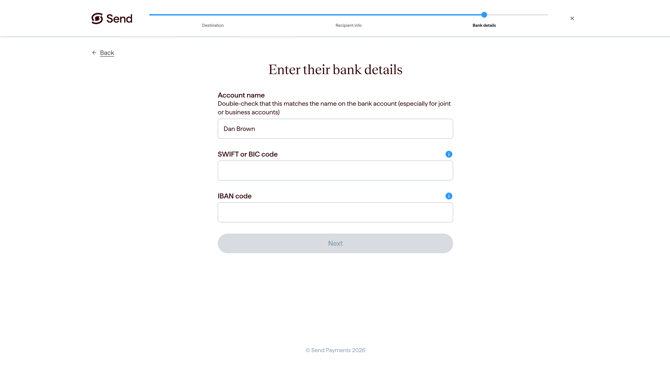
When you create a new recipient in Send, the last step is to “Enter their bank details”. The IBAN field will appear if it’s required.
Step 2: Get the code from the recipient
Ask the recipient for their IBAN code.
They can usually find it in their online banking, on a recent account statement or by checking with their bank.
Step 3: Enter the code into Send
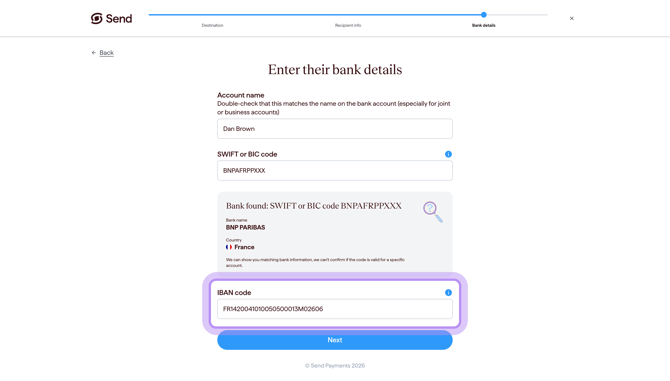
Type the IBAN code into the IBAN field.
- Enter the IBAN exactly as your recipient has provided it.
- Take care to copy every character without adding spaces at the start or end.
- Don't add spaces or dashes.
Step 4: Check the details
Before continuing, check that the IBAN matches the details provided by your recipient.
You should also check the recipient’s name and any other bank details before saving.
What happens next
After you submit the IBAN, Send will guide you through the next step in setting up your transfer.
If you have any concerns about the details you've entered, contact our support team before continuing.
Common questions
Send won't accept the IBAN I entered
Double check that the bank country and the IBAN you entered match. If something doesn’t look right check with your recipient, and make sure no characters were missed when copying it. If you're still stuck, contact our support team.
My recipient says they don't have an IBAN
Not every country uses IBANs. Ask your recipient to confirm the correct bank details for receiving an international payment.
If Send is asking for an IBAN and your recipient’s bank says they do not have one, contact our support team before continuing.
Do I still need a SWIFT/BIC code with an IBAN?
Sometimes. A SWIFT/BIC identifies the bank while the IBAN identifies the bank account, including the bank and the country where it is held.
If Send asks for a SWIFT/BIC code as well as an IBAN, ask your recipient or their bank to provide it.
For more information, see Information on SWIFT/BIC numbers.
My IBAN doesn't look the right length
IBAN length is fixed for each country, but the length varies between countries.
If the IBAN you've been given doesn't look right, ask the recipient to double check it with their bank, and make sure no characters were missed when copying it.
Is the IBAN the same as my account number?
Not exactly.
An IBAN is a longer code used for international payments. Your local account number may form part of the IBAN, but they are not the same thing.
For international payments, use the full IBAN if your recipient’s bank has issued one.
Contact us
Call Us
Phone: 1800 982 418
International: +61 7 5619 5700
Hours: 8:30am - 5:30pm AEST/AEDT, Monday - Friday