
What is a CBU code?
CBU stands for Clave Bancaria Uniforme, which means Uniform Banking Code.
A CBU is a 22-digit code used to identify a bank account in Argentina.
- It is always exactly 22 digits long.
- It is made up of numbers only.
When you'll need an CBU code on Send
You'll need an CBU code when you are sending a payout to a bank account in Argentina. You’ll need a CBU code regardless of the currency you’re sending.
What you'll need to send to Argentina
Send supports international transfers to Argentina in ARS, AUD, USD, GBP and EUR.
To set up a recipient in Argentina, you'll need:
- The recipient's CBU (22-digit account code).
- The recipient's bank's SWIFT/BIC code (an 8 or 11 character code that identifies the bank). For details, see Information on SWIFT BIC numbers.
- The recipient's full residential address.
- Any other information shown in Send
If you're sending Argentine Pesos (ARS), you'll also need:
- The recipient's 11-digit CUIL if the recipient is an individual. See Information on CUIL Tax Identifying numbers.
- The recipients 11-digit CUIT, if the recipient is a business
- The recipient's email address.
- The recipient's phone number (with country code).
- The purpose of payment
Some recipient account types, for example judicial accounts, may not supported
Where to get the CBU code
Your recipient is the best person to provide this code.
If they’re not sure where to find it, they can check:
- Their online banking. Many Argentinian banks show the CBU code in the account details section.
- A recent bank statement. The CBU code is usually printed near the account number.
- Their bank directly.
How to add a recipient's CBU code
Step 1: Open the Add recipient screen
- Log in to your Send account.
- Go to the Recipients page.
- Select Add recipient.
- Select Argentina as the recipient's country.
Step 2: Enter the CBU code
When you create a new recipient in Send, the last step is Enter their bank details. The CBU code field will appear if it’s required.
- Enter the CBU code exactly as your recipient has provided it.
- Take care to copy every character without adding spaces at the start or end.
- Don't add spaces or dashes.
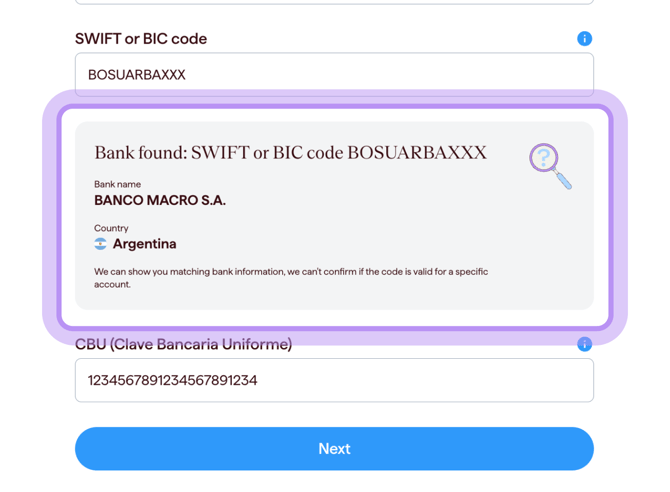
Step 3: Check the codes match
Before continuing, check that the CBU matches the details provided by your recipient.
You should also check the recipient’s name, address and any other bank details before saving.
What happens next
After you submit the CBU, Send will guide you through the next step in setting up your transfer.
If you have any concerns about the details you've entered, contact our support team before continuing.
Common questions
I have a CBU but no SWIFT/BIC code
You'll need both to send money to Argentina.
- Ask the recipient for their bank's SWIFT/BIC code, or ask the bank directly.
- For details, see Information on SWIFT BIC numbers.
Do I need to provide my recipient's tax number?
For ARS payments, yes. You may be asked for a CUIL if the recipient is an individual or CUIT if the recipient is a business.
- For details, see Information on CUIL Tax Identifying numbers.
I entered the CBU but I can’t save the recipient
- Re-check the CBU and other recipient details.
- Contact our support team for help with next steps.
My recipient gave me something other than a 22-digit CBU
- Ask the recipient to confirm the full 22-digit CBU with their bank.
- If you're not sure what to enter, contact our support team for help with the next steps.
I'm not sure if the code I have is a CBU
- Ask the recipient to confirm with their bank.
- If you're still unsure, contact our support team for help with the next steps.
Contact us
Call Us
Phone: 1800 982 418
International: +61 7 5619 5700
Hours: 8:30am - 5:30pm AEST/AEDT, Monday - Friday