
What is an Agency code?
An Agency code is a numerical code used to identify a bank branch in Brazil.
- It is between 3 and 7 digits long (numbers only).
- It is sometimes called a branch code or agência. These names refer to the same code.
- An Agency code identifies the bank branch, not the account. You will normally also need an account number or IBAN.
When you'll need an Agency code on Send
You'll need an Agency code when you are sending a payout in Brazilian Real (BRL) to a bank account in Brazil.
If you are sending a different supported currency (such as AUD, USD or EUR) to a Brazilian bank account, an Agency code is not required. In that case Send will ask you for the recipient's bank details using a different combination of fields.
Other details you'll need for BRL payments
For payouts in BRL to Brazil, Send will also ask you for the following recipient details:
- The recipient's IBAN (the account identifier used in Brazil).
- The recipient's tax code.
- Provide the Cadastro de Pessoas Físicas (CPF) if the recipient is an individual.
See, What is a CPF and why do I need it for my Brazilian recipient? - Provide the Cadastro Nacional da Pessoa Jurídica (CNPJ) if the recipient is a business
See, What is a CNPJ and why do I need it for my Brazilian recipient?
- Provide the Cadastro de Pessoas Físicas (CPF) if the recipient is an individual.
- The recipient's phone number.
- The recipient's email address.
- The recipient's residential address (country, city, street and postal code).
You'll be prompted for these on screen when you set up the recipient. Have them ready before you start. Note: Send may also contact you to collect a Purpose of Payment.
Where to get the agency code
Your recipient is the best person to provide this code. If they aren't sure where to find it, common sources include:
- Their online banking. Many Brazilian banks show the Agency code (agência) in the account details section, often next to the account number.
- A recent bank statement. The Agency code is usually printed near the account number and labelled agência.
- The bank's official website. Some banks list their Agency codes in their FAQs or on their branch pages. Ask your recipient to use the bank's official website rather than search results.
- Their bank directly. If your recipient still can't find the code, they can contact their bank by phone or online chat to confirm the correct Agency code for their account.
Steps to adding a recipient's Agency code
Step 1: Open the Add recipient screen
- Log in to your Send account.
- Go to the Recipients page.
- Select Add recipient.
- Choose Individual as the recipient type.
- Select Brazil as the recipient's country.
- Select Brazilian Real (BRL) as the currency.
Step 2: Enter the agency code
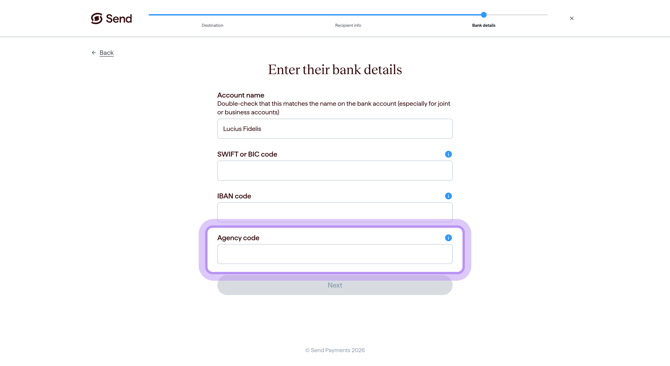
When you create a new recipient in Send, the last step is Enter their bank details. The Agency code field will appear if it's required.
- Enter the Agency code exactly as your recipient has provided it.
- Take care to copy every character without adding spaces at the start or end.
- Don't add spaces or dashes.
Step 3: Check the codes match
Before continuing, check that the Agency code matches the Agency code code given to you by the recipient.
What happens next
When you enter an Agency code on Send:
- Check the details on screen against what your recipient has given you. If anything looks different, double-check the code with the recipient before continuing.
- Enter the Agency code as plain digits, between 3 and 7 numbers long, with no spaces or hyphens.
Common questions
My recipient gave me a different code - which do I use?
Your recipient may have several details for their account. Use whichever set of details Send asks you for at the time of sending. If you're not sure, check with the recipient or contact our support team.
The Agency code I entered isn't being accepted
- Make sure you have entered between 3 and 7 digits, with no hyphens and no spaces.
- Confirm the Agency code with the recipient or their bank, in case the code is incorrect or out of date.
- If the bank details cannot be validated, you may see a message that the bank routing number is invalid for Brazil. If this happens, double-check the code and try again, or contact our support team.
My payment to Brazil was returned
If a payment has been returned, please contact our support team. We will look at it with you and help you with next steps.
Contact us
Call Us
Phone: 1800 982 418
International: +61 7 5619 5700
Hours: 8:30am - 5:30pm AEST/AEDT, Monday - Friday