
Why you've been asked to submit a task
A task is a request for information, clarification or supporting documents. We may ask you to complete a task to:
- Fulfil our regulatory obligations under our licence.
- Review certain account, recipient or transaction activity where required.
- Confirm or update information about you, a recipient, a payment, or funds added to your wallet.
Tasks may apply to both individual and business accounts. If you have a business account, we may also ask for additional information about your business, such as company details or supporting documents.
To learn how we collect, use and protect your personal information, see our Privacy Policy.
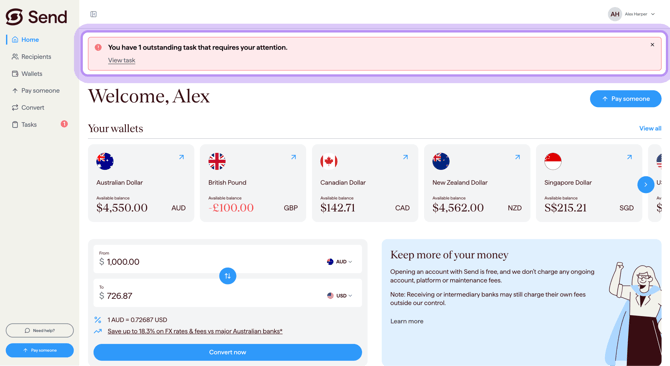
What "submitting a task" means
Submitting a task is the way you give us the information we've asked for. Depending on the task, you may need to:
- Upload a document
- Type an answer in a free-form text field
- Pick an option from a list
- Select a date
Most tasks take less than a minute if you have the information ready.
What happens if I don't submit?
If you don't complete a task, the related action may be delayed or may not be able to proceed until the requested information is provided. For example:
- Your account setup may not move forward
- A recipient may not be approved
- A payment or international transfer may be held
- Money coming into your wallet may not be released
If you're not sure why we've asked, or if something doesn't look right, contact our support team and we'll be happy to help.
What to do next
To complete the task, see these articles:
- "What's a task and why do we ask for this information" - the full overview of tasks, including how you'll be notified and where to find them.
- "How to submit a task" - step-by-step on submitting your response.
- "Accepted documents and file sizes" - if you need to upload a document, this shows you which file types we accept and the size limits.
- "I need information from my recipient to complete a task" - if the task is asking for information that only your recipient can provide.
- "How to decline a task" - what to do if you can't or don't want to submit the task.
- "Tasks - frequently asked questions" - quick answers to common questions about tasks.
Common questions
I'm worried about giving Send my personal information
- We may ask for information or documents where required to support our compliance obligations, or to review account, recipient, or transaction activity.
- You can read more about how Send handles personal information in our Privacy Policy.
- If you're not sure about a request, contact our support team before you submit anything.
I don't recognise this request - is it really from Send?
- If you are unsure whether a request is genuine, log in to your Send portal directly rather than using links in an email.
- If you can't see a matching task once logged in, contact our support team to confirm.
I need to get this information from my recipient
- Open the task and click Ask recipient to copy a pre-written message that explains exactly what we need.
- For more help, see "I need information from my recipient to complete a task".
I can't complete this task right now
- If you can't provide what we've asked for, see "How to decline a task" for what to do.
- If you only need more time, you can return to the task later from your Send portal.
Contact us
Call Us
Phone: 1800 982 418
International: +61 7 5619 5700
Hours: 8:30am - 5:30pm AEST/AEDT, Monday - Friday