
Before you start
- The Send Portal is a web-based platform. There is no mobile app.
- You will need an internet connection and an up-to-date web browser.
How to fix common browser-related issues
Step 1: Keep your browser up to date
- Older browser versions may cause pages to load incorrectly or stop working.
- Check your browser's settings or "About" page to make sure you are on the latest version.
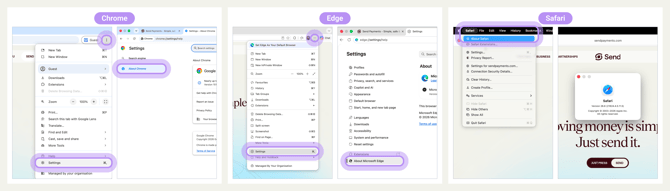
Step 2: If something is not working, try a quick reset
If a page is not loading or behaving strangely, try these steps in order:
- Refresh the page.
- Close the tab and open the Portal in a new tab.
- Clear your browser's cache and cookies, then sign in again.
- Try a different browser.
- Restart your device.
Step 3: Identity verification during onboarding
- When you sign up, you may be asked to complete identity verification in the Send Portal.
- Follow the on-screen instructions to complete this step.
What happens next
- After updating your browser or trying the steps above, the Send Portal should load and work normally.
- If a refresh or a different browser fixes the issue, you do not need to contact us.
- If problems continue, please contact our support team with:
- the browser name and version you are using
- the device and operating system
- a short description of what you were doing and what went wrong
Have a time-sensitive transfer?
If you need to send money urgently and cannot access the Send Portal, please call our customer service team. We can help you complete your payment over the phone.
Common questions
The page is blank or won't load
- Your browser may be out of date.
- Refresh the page and update your browser to the latest version.
I keep getting logged out or stuck on the login page
- Try opening the Portal in a different browser, or in a new tab outside any in-app browser (for example, links opened from inside a social media app).
Buttons or fields aren't appearing or clickable
- This usually means part of the page didn't load.
- Refresh the page, clear your cache, or try a different browser.
How do I clear my cache
- Google Chrome
-
- Menu Navigation: Click the three dots (top right) > Delete Browsing Data.
- Select a time range (e.g., All time).
- Check the box for Cached images and files.
- Click Delete data.
- Apple Safari
- Safari in the top menu bar.
- Click Settings.
- Go to the Privacy tab and click Manage website data.
- Click Remove all data.
- Microsoft Edge
- Click the three dots (top right) > Settings.
- Go to Privacy, search, and services.
- Select Clear browsing data.
- Click Choose what to clear and select a time range.
- Check Cached images and files.
- Click Clear now.
The Portal is very slow
- Slowness is usually caused by your internet connection, browser extensions, or an outdated browser.
- Try closing other tabs, turning off browser extensions, or switching to a different browser.
Contact us
Call Us
Phone: 1800 982 418
International: +61 7 5619 5700
Hours: 8:30am - 5:30pm AEST/AEDT, Monday - Friday